
Limit Switch Boxes
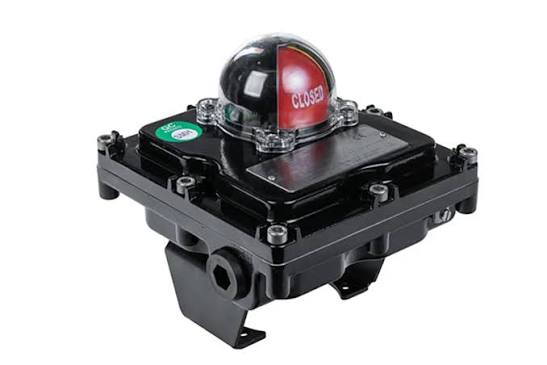
A limit switch box (switch box, position indicator) is the valve’s proof-of-action device. Mounted on the actuator, it converts shaft position into discrete electrical signals — open, closed, intermediate — plus an unambiguous visual flag. The DCS does not trust the command it sent; it trusts the switches that came back.
How It Works
A shaft, driven by the actuator output (direct NAMUR coupling or linkage), carries adjustable cams. Each cam trips a switch element at its set angle:
- Electromechanical microswitches — dry contacts, gold or silver-plated; universal, simple, fuse them
- Inductive proximity (PNP/NAMUR) — no moving contact, survives vibration, suits IS loops
- Reed sensors — low power, magnet-driven, common in compact boxes
- Optical — rare; sealed beacon logic in some designs
- Typical complement: 2 switches minimum (open + closed), 4 or more for interlocks
- Visual indicator: red/yellow flags or domed beacon — the field’s fastest check
Types & Variants
- NAMUR VDI/VDE 3845 box — standard envelope for quarter-turn actuators
- Integrated in positioner — smart positioners output limit status digitally (no separate box)
- Linear-travel boxes — for gate/globe stroke via yoke linkage
- Beacon boxes — illuminated domes for remote visual proof
- Explosion-proof / IS — flameproof enclosures or intrinsically safe sensors
- Double-protected contacts — redundant switches wired to independent systems for SIS
What to Compare Before You Buy
| Parameter | What it means | Why it matters |
|---|---|---|
| Switch element type | Dry contact vs PNP prox vs NAMUR current loop | Must match the DCS input cards and IS certification of the loop |
| Number of switches | 2, 4 or more, with independent cams | Interlocks and permissives need intermediate set-points, not just end-of-travel |
| Cam adjustment | Tool-set vs hand-set, positive locking | Loose cams drift — the classic false-signal generator |
| Enclosure | IP67/IP68, NEMA 4X, double-sealed dome | Washdown and offshore environments kill fogged, leaking boxes |
| Certification | ATEX/IECEx, SIL data for SIS use | Proof-of-action in SIS loops must follow the certified data |
| Visual indicator | Flags vs beacon, standard vs custom colours | The operator at 50 metres reads the flags first, not the DCS |
Where It Is Used
Everywhere the DCS must know the valve moved: ESD isolation valves (proof-of-close), pump discharge permissives, interlock chains, sequence steps, and any remotely located valve no operator walks past.
- ESD proof-of-action on isolation and vent valves
- Pump permissive: discharge valve proven open before start
- Interlock chains (e.g. flare header, pig launcher doors)
- Remote sites where the flag/beacon replaces a site visit
Common Brands
Stonel
Stonel — The premium switch/transmitter brand for severe service; Axiom series.
Topworx (Emerson)
Topworx (Emerson) — GO Switch proximity and DX position monitors.
Moniteur (Bray)
Moniteur (Bray) — DM/PM series beacon boxes, strong visual indicators.
Rotork
Rotork — Switchboxes matched to Rotork electric actuator stacks. Full profile →
SMC
SMC — Auto-switches for linear cylinders (reed/ prox strip-ons).
Valbia
Valbia — Position indicator boxes for their pneumatic quarter-turn line.
Field Problems & Fixes
| Symptom | Likely cause | Fix |
|---|---|---|
| DCS shows open, valve is not | Cam drifted or misadjusted; switch failed closed | Re-set and lock the cam; function-test the switch element |
| Signal flaps with vibration | Microswitch chatter or worn cam follower | Move to inductive sensors; re-torque cam screws with thread-lock |
| Fogged dome, unreadable flags | Failed enclosure seal, breathing in humid climates | Replace gaskets/double-sealed dome; add desiccant |
| No signal though flags show travel | Wiring fault, wrong IS barrier parameters, blown fuse | Loop-check from switch to marshalling; verify barrier config |
| Intermittent proof-of-close failures | Contact resistance drift on gold contacts | Measure loop resistance; switch to prox or replace contacts |
Related: Valve positioners (continuous position vs discrete proof), position transmitters and all accessories.
Note. Generic engineering description for education. Brand names above are trademarks of their respective owners; RegValve.com is not affiliated with or endorsed by them. For installation and safety settings, follow the manufacturer’s manual and your plant procedures.